AIO RELAY
All-in-One Local Multicaster (Post-SaaS Edition)Stop paying the SaaS toll. Multi-stream from your own network.
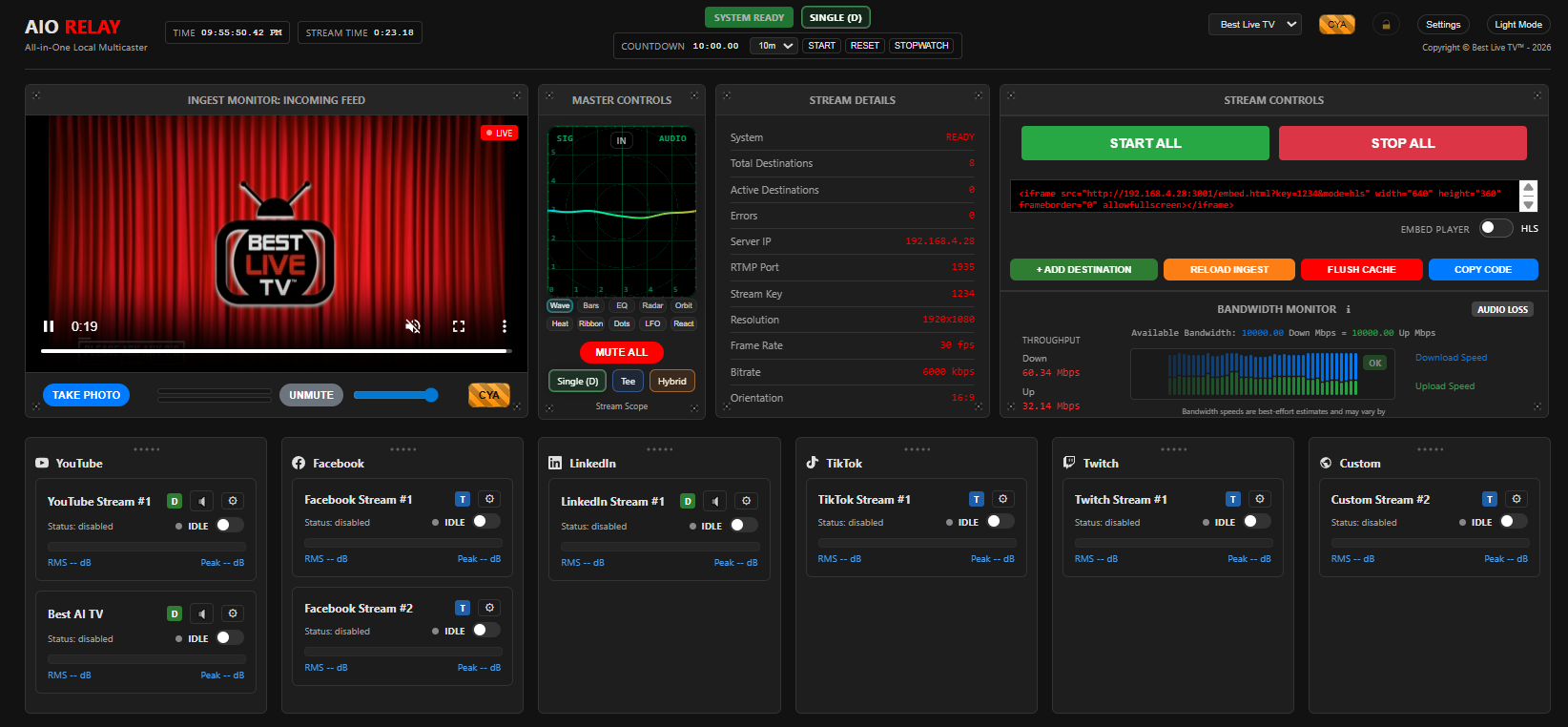
AIO Relay™ is a local relay appliance: ingest once, then push to multiple RTMP destinations. Your outputs are limited by your bandwidth supply, not a monthly plan. It can also originate a live feed from the built-in AIO Studio (featuring webcam, microphone, and canvas/desktop capture mixes) when you do not want to drive ingest from OBS or another encoder.
AIO Studio Ingest NEW
Use the built-in AIO Studio as the source: stream your camera, microphone, dual screen shares (SS1|SS2 split & 3-way grid), media file PiP overlays, lower thirds, brand watermarks, and fade-to-black clean broadcast shutdown.
Local-first
Runs on your machine. Keep latency and control in your hands.
10-Mode Visualizer
Real-time audio telemetry with 10 distinct modes including Wave, Radar, Heatmap, and Reactor.
Profiles + Presets
Save keys, reorder platforms, and lock the layout. Your workflow remains consistent across every session.
Why local beats SaaS relays
No cloud detours
Skip the land-to-cloud-to-endpoint routing tax. Stream from where your encoder already lives.
Predictable scaling
Know your inputs and outputs. Add destinations by math: bitrate times destinations (plus overhead).
Less churn risk
You own the pipeline. No pricing surprises, feature removals, or forced migrations.
Local Pipeline vs Cloud Detour
Traditional SaaS services ingest your signal to their cloud, add latency, and charge per destination. AIO RELAY v2.1 keeps your signal on your wire with a modular, future-proof transport architecture.
SaaS Detour (Latent & Paid)
graph LR
    S1[Encoder] -->|Ingest| C1(Cloud CDN)
    C1 -->|Relay| P1[Twitch]
    C1 -->|Relay| P2[YouTube]
    C1 -->|Relay| P3[Custom]
    style C1 fill:#b50912,stroke:#fff
AIO Relay™ v1.x (Legacy NMS)
graph LR
    E1[Encoder] --> NMS[Node Media Server]
    NMS -->|HLS| MON[Monitor]
    NMS --> FF[FFmpeg Egress]
    FF --> D1[Twitch]
    FF --> D2[YouTube]
    FF --> D3[Custom]
    style NMS fill:#b50912,stroke:#fff,stroke-dasharray: 4 2
    style FF fill:#e50914,stroke:#fff
AIO Relay™ v2.1 (MediaMTX) NEW
graph LR
    STUDIO["AIO Studio (WebRTC)"] -->|WHIP| MTX{MediaMTX}
    E2["Encoder (RTMP)"] --> MTX
    PLAYLIST["Playlist (video files)"] --> MTX
    MTX -->|WebRTC/WHEP| MON[Monitor UI]
    MTX -->|WebRTC / LL-HLS Fallback| EMBED[Embed Player]
    MTX --> FF[FFmpeg Egress]
    FF --> D1[Twitch]
    FF --> D2[YouTube]
    FF --> D3[Custom]
    MTX -.->|Webhooks| API[Express API]
    API -->|Lifecycle| MTX
    style MTX fill:#e50914,stroke:#fff,stroke-width:2px
    style STUDIO fill:#1f9f5f,stroke:#fff
    style PLAYLIST fill:#f5a623,stroke:#fff
    style API fill:#1f4fd1,stroke:#fff
    style MON fill:#0078d4,stroke:#fff
    style EMBED fill:#5c2d91,stroke:#fff
What's Inside AIO Relay™ ?
v2.1 Transport & Processing Core NEW
- WebRTC Ingest (AIO Studio): Built-in browser-based camera/microphone/canvas mixing with WebRTC/WHIP publish transport NEW
- WebRTC-only Preview Monitor: Ultra-low latency WHEP preview monitor with on-demand HLS fallback for embeds NEW
- MediaMTX transport layer: native RTMP ingest, built-in LL-HLS serving, REST API for lifecycle control
- FFmpeg processing layer: encode, transcode, egress, compositing via filter chains
- Multiple stream modes: Dedicated (multi-FFmpeg), Tee, Hybrid
- 10-Mode Master Switch Visualizer (Wave, Bars, EQ, Radar, Heat, etc.)
- Webhook-based event handling replaces in-process NMS listeners
- Bandwidth Quality Scoring (Best-effort real-time network stability estimates)
- Global output controls: resolution, FPS, video/audio bitrates, aspect ratio
- Per-destination output overrides for Dedicated outputs
- Profiles: persistent keys, platform ordering, and layout lockouts
- Managed ingest source selection: External RTMP, Playlist loop, or AIO Studio NEW
- AIO Studio capabilities: camera, mic, dual screen shares (SS1|SS2 split & 3-way grid), media FILE overlays, Lower Thirds (L3), Title Mark logos (TM), Fade To Black (FTB), VTT captions, Radio mode, and local recording NEW
- AIO Studio audio: Noise gate, auto-ducking, mic gain slider, lo-fi walkie-talkie mode, and stereo VU level meters NEW
- Real-time canvas compositing: PiP stage swap, media playback controls, expand/collapse overlays, and brand watermarking NEW
Upgrade paths (v2.1+ planned)
- SRT/RIST egress options (advanced networks)
- Multi-ingest routing via MediaMTX path API
- Clipping and local archiving controls
- Automations: schedules, presets, and one-click scene sets
- Multi-cam, ISO recording