
AIO RELAY - Technical Specs
Technical spec sheet
These specs reflect the v2.1 implementation featuring MediaMTX transport architecture. Focus is on modular transport and the built-in AIO Studio ingest path.
Core pipeline
Transport Layer
MediaMTX — native RTMP ingest, LL-HLS serving, REST API for stream lifecycle
Processing Layer
FFmpeg — encode, transcode, egress, compositing via filter chains
Ingest
RTMP (local via MediaMTX), Playlist loop, or built-in AIO Studio
Egress
RTMP / RTMPS to destination platforms via FFmpeg
Event Handling
Webhook-based (publish-start / publish-end) replaces in-process NMS listeners
Lifecycle
Graceful shutdown with supervisor fallback cleanup
Monitor
Native LL-HLS via MediaMTX, HLS.js playback (no FLV)
v2.1: Node Media Server fully replaced. FLV.js removed — HLS.js is the only browser playback path.
Watchdog polls
GET /v3/paths/get/{key} on the MediaMTX API instead of HLS mtime.
AIO Studio source disconnect uses DELETE /v3/paths/delete/{key} instead of NMS session reject.
Visualizer Modes
- Wave / Bars / EQ: Classic signal analysis.
- Radar / Orbit / Reactor: Dynamic spatial telemetry.
- Heat / Ribbon / Dots / LFO: Advanced spectral density vis.
Toggled via the Master Switch panel; persisted as
masterSwitch in the active profile/state contract.
Operational limits
- Single Instance: Desktop appliance currently targets port 3001; user-selectable port remains deferred.
- Bandwidth Quality: OK / WEAK / POOR / BLOCKED / FAILURE scoring based on throughput and jitter.
- Layout: Minimum width 500px, responsive 1440px desktop base.
- AIO Studio resolution presets: 720p, 1080p, 4K.
Bandwidth monitor semantics: appliance IN/OUT reflects measured AIO Relay ingest/egress throughput, while Net reflects total physical NIC DOWN/UP traffic on the selected uplink adapter.
Persistence
- Profiles: settings + destinations saved per profile.
- Saved keys and ordering persist across restarts.
- Runtime lock states stay in the UI only and are not written into profile settings.
- Startup now hydrates settings from the server before write-back effects are allowed to persist changes.
Recovery controls (v2.1)
- Standby CYA Loop: automatically loops user's active CYA banner graphic with silent audio on source drop to maintain 100% continuous broadcast ingest uptime.
- 3s Audio Loss Threshold: requires 3.0+ seconds of continuous dead air (< -40 dB) before flagging
AUDIO LOSS, preventing false alarms during speech pauses. - Studio Auto-Recovery: canceling screen share returns smoothly to camera/mic mode without WebRTC teardown or ICE delays.
- Reload Ingest: reloads ingest feed path/player pipeline via MediaMTX API.
- Flush Cache: clears cached HLS segment folders under
media/live/*. - Reset: broader runtime reset scope including MediaMTX lifecycle restart.
AIO Studio Compositor
- Dual Screen Layout: Automatically splits the canvas 50/50 side-by-side when Screen Share 1 (SS1) and Screen Share 2 (SS2) are both active.
- 3-Way Grid Layout: Composites Camera on the left half (full height), SS1 on the top-right quarter, and SS2 on the bottom-right quarter when active in Mix.
- Media File Overlay (FILE): Inject local video files (.mp4, .webm, .mov) or still images (.png, .jpg, .webp) with WebAudio pipeline sub-mixing, expand-to-main, collapse-to-PiP, and synchronized playback controls.
- Lower Third & Watermark Overlays: Trigger animated 5-second Lower Third (L3) titles/subtitles and persistent Title Mark (TM) branding logos over live broadcasts.
- Fade To Black (FTB): Emergency broadcast shutdown with 1.5s audio fade, microphone mute, and clean ingest pipeline teardown.
- Studio Toolbar Controls: High-resolution PNG snapshot capture (PHOTO), local MP4/WebM recording (REC), real-time WebVTT caption file generation (VTT), Radio audio-only egress mode (RADIO), master audio VU meters, and AI Closed Captions (CC).
- Resilient Auto-Recovery: SS1 auto-revert guard automatically returns stage to camera/placeholder when a shared window closes, detaches streams before teardown to avoid stale listeners, and prevents button state desyncs.
Open-source media stack
- AIO Relay™ uses MediaMTX for RTMP transport and LL-HLS serving.
- FFmpeg/FFprobe handles encode, transcode, egress transport, and compositing workflows.
- Both are open-source. License obligations depend on the specific builds and enabled components.
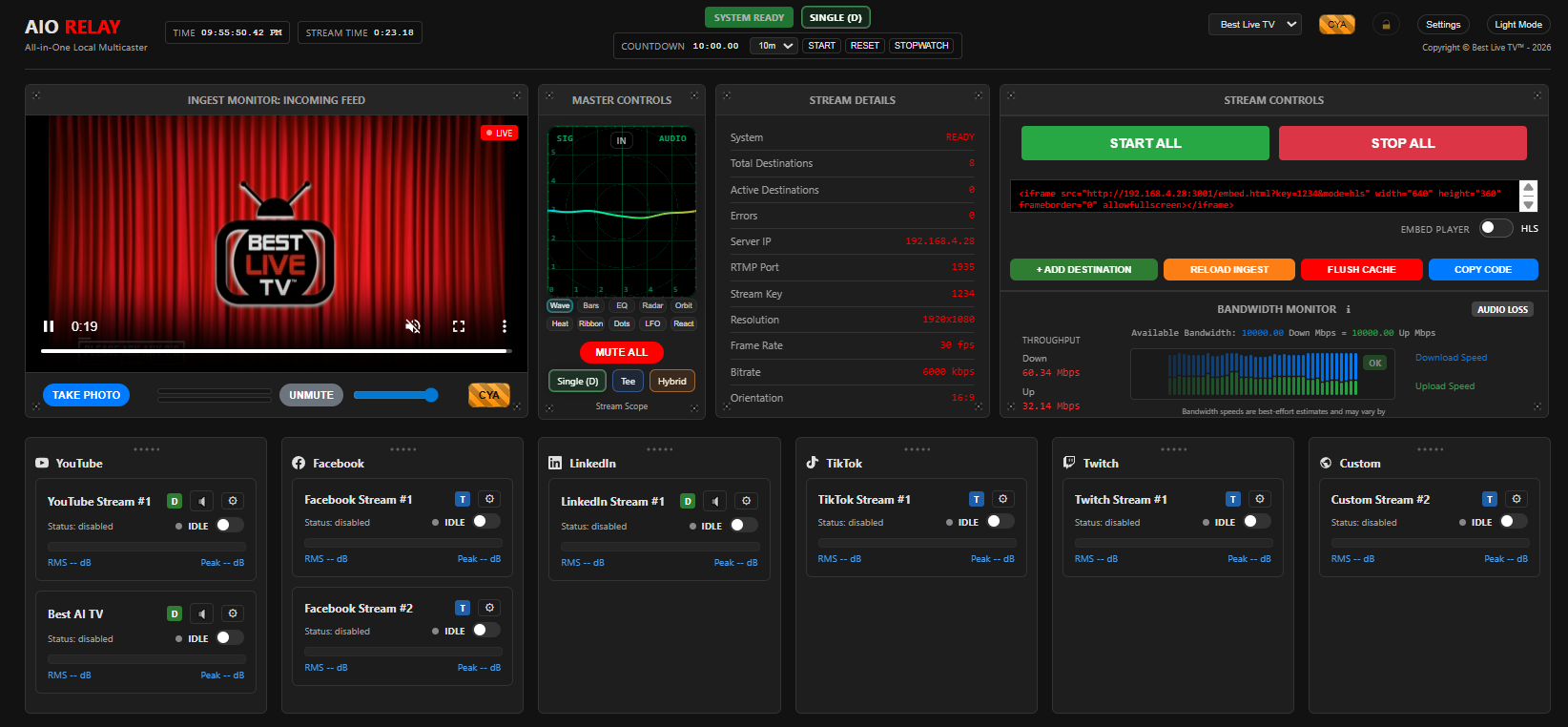
Control area map (v2.1)
Annotated layout for website users learning the operator panel quickly.
 1
2
3
4
5
6
1
2
3
4
5
6
1. Ingest/Studio Panel: AIO Studio inputs (camera, microphone, canvas mixes, and audio processing).
2. Master Switch Panel: visualizer screen, power/reset controls, and scope mode controls.
3. Stream Details: ingest endpoint/mode, output profile, and apply settings.
4. Stream Controls: start/stop all, embed code generator, reload/flush controls, and add stream.
5. Throughput + Bandwidth Monitor: quality scoring, real-time throughput metrics, and network stability.
6. Destination Board: destination platform columns, stream cards, per-card controls, and layout lockouts.